【Debugging Notes】 How to Get a Cookie Sent on a Cross-Origin Request
Background
This is a debugging write-up from my time at cacdi. We were integrating with a partner's ("Compal") API, and that API authenticated every request with a session cookie instead of a bearer token.

The backend already had Access-Control-Allow-Origin configured, so the frontend wasn't blocked by CORS on a plain request. But calling the API from localhost during local development, the browser never sent the cookie along — even though Postman, given the same cookie, could call the API and get a valid response back. So the credential itself was fine. The question was purely about when a browser is willing to attach a cookie to a cross-origin request.
The Setup
- The partner's API authenticates via cookie.
- The backend already sets
Access-Control-Allow-Origin, so the frontend isn't blocked by CORS. - Open question: how do we get a cookie attached when calling that API from
localhost? - Postman, given the cookie manually, calls the API successfully and gets a result back.
- The frontend needs to set
credentials, and the backend needsAccess-Control-Allow-Credentials— but that alone didn't explain what was happening in the browser.
To isolate the cookie behavior from the rest of the app, I reproduced it directly in DevTools: manually insert a cookie in the Application panel, then see whether an outgoing request to the partner's domain actually carries it.
Reproducing It in DevTools
Attempt 1 — name & value only

Insert just Name and Value, leaving Domain, Secure, and SameSite untouched. Result: the outgoing GET request still doesn't carry the cookie. With none of the attributes explicitly set, the browser doesn't consider it valid for a cross-site request.
Attempt 2 — add SameSite=None

Set SameSite to None. Result: DevTools refuses to save the cookie at all — the row is highlighted red as invalid. Since Chrome 80, SameSite=None is only accepted together with Secure; without Secure, the browser drops it before it's even stored.
Attempt 3 — add Secure

Check Secure alongside SameSite=None. Result: the cookie is now saved successfully — but the API call still doesn't include it. Domain is still localhost, which doesn't match the actual request domain, so the browser still won't attach it.
Attempt 4 — match the request's Domain

Change Domain to match the request's domain (the partner's domain). Result: the cookie is finally attached to the API call. One side effect worth knowing: once Domain no longer matches the current page's own origin, the cookie disappears from the Application → Cookies panel — you have to check it under Network → (request) → Cookies instead, which is the only place it still shows up.
Why: The Conditions For a Cookie to Be Sent
Set-Cookie: Path=/; Domain=example.com; Secure; SameSite=Strict
- Domain — must match the request's domain.
- Secure — if set, the request must be made over HTTPS.
- SameSite — one of three modes:
Strict,Lax(the default), orNone.- As of Chrome 80 (2020), the default changed from
NonetoLax. Noneis only treated as valid when paired withSecure.
- As of Chrome 80 (2020), the default changed from
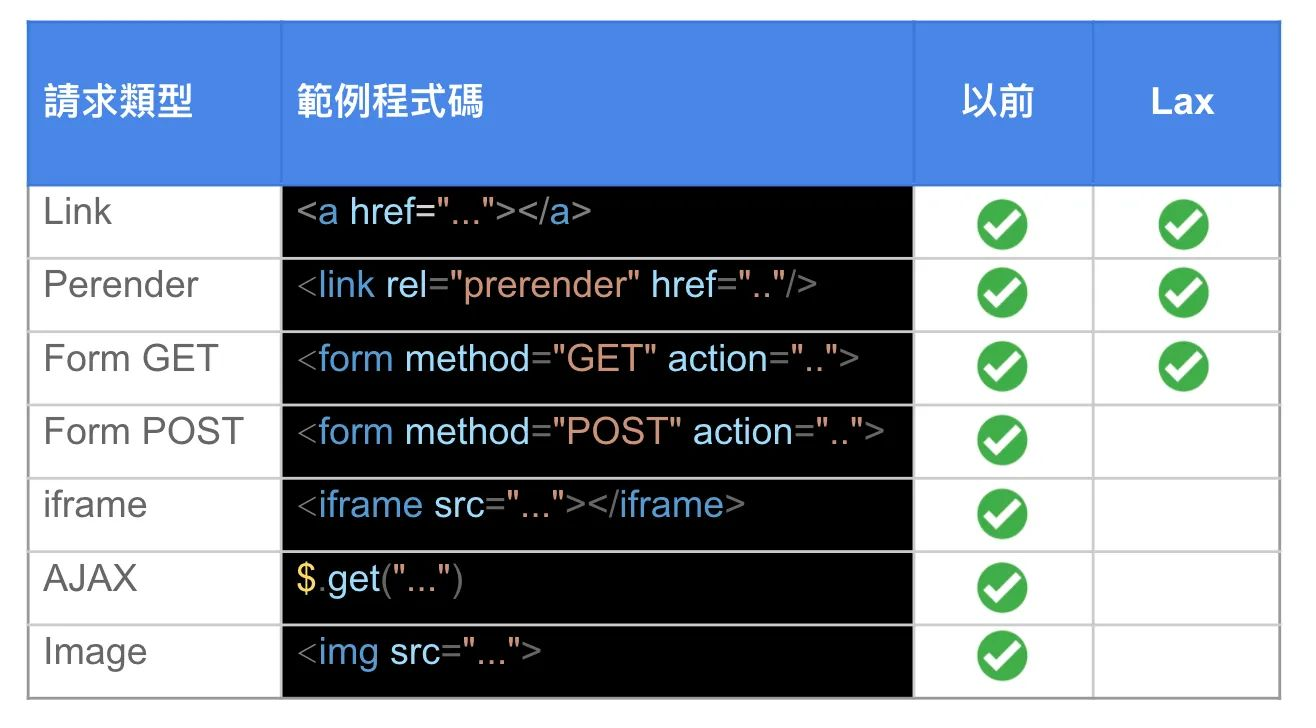
The table below (from Chrome's own developer docs) shows which request types still carry a SameSite=Lax cookie cross-site versus the old default behavior — top-level navigations (Link, Form GET) still do, but Form POST, iframe, AJAX, and Image requests no longer do under Lax:
Applying It to the Real Integration
Reproducing the mechanism in DevTools made the actual fix straightforward — it needed changes on both sides, not just one:
- Backend: issue the session cookie with
Domain,Secure, andSameSite=Noneset, so the browser is willing to store it and forward it on a cross-site request in the first place. - Frontend: set
credentials: 'include'(fetch) orwithCredentials: true(axios/XHR) — without this, the browser won't attach any stored cookie to a cross-origin request, no matter how the cookie itself was issued. - Backend: return
Access-Control-Allow-Credentials: true.Access-Control-Allow-Originalone lets the browser send the request; withoutAllow-Credentialsthe browser blocks the frontend from reading the response even though the cookie went out.
All three have to be true at once — missing any one of them looks identical from the frontend: the request goes out, but the API responds as unauthenticated.
Key Takeaways
- CORS and cookie-attachment are two independent gates.
Access-Control-Allow-Origin/Allow-Credentialscontrol whether the browser lets your JS read the response.Domain/Secure/SameSitecontrol whether the browser attaches the cookie to the request in the first place. Both have to pass — fixing one without the other still fails. - Chrome 80 changed the default. Any flow that needs a cookie sent on a cross-site
fetch/XHR(not just a top-level navigation like clicking a link) needsSameSite=None; Secureset explicitly — the old implicit behavior no longer applies. - DevTools is a fast way to isolate the mechanism from the app. Manually editing a cookie's
Domain/Secure/SameSitein the Application panel let me test each condition in isolation without a real login flow — but remember that onceDomainis changed away from the page's own origin, you have to inspect it via Network → Cookies, since it drops out of the Application panel view.
References
- Chrome Developers — "Get Ready for New SameSite=None; Secure Cookie Settings"
- MDN — SameSite cookies explainer
- Chrome's SameSite=Lax default rollout notes for third-party cookies